
Accepting every connection request or connecting with people you don’t know is the fastest way to ruin your LinkedIn engagement. James West explains why the quality of connections is more important for engagement than content and how to screen connections now that LinkedIn has changed the tools it offers.
I have a strict rule on LinkedIn (and at networking): I don't want connections who have no interest in communicating with me.
That doesn't mean everybody in my network needs to become a client, referral partner or best business buddy. But there has to be a genuine point of connection; otherwise it’s meaningless. For example, if somebody chooses to send me a connection request, I think it is reasonable to establish whether they actually want some form of professional relationship.
“Why do you bother screening connection requests - surely more connections mean more attention and reach?”
It’s logical to think that a bigger LinkedIn network must be better. I’ve not only observed this to be untrue, I can also explain with logic why having too many of the wrong connections damages your engagement.
It’s simple. When you post on LinkedIn, like any social platform, it shares your content to a small sample of your connections. Depending on the reaction to that content, LinkedIn decides whether to share it with more people. Or shut it down.
Therefore, if you’re connected with loads of people who don’t know or care about you and the things you have to say, the post is very likely to get no reaction.

“It’s logical to think that a bigger LinkedIn network must be better. I’ve not only observed this to be untrue, I can also explain with logic why having too many of the wrong connections damages your engagement.”
James West, ONLE Networking
The analogy I like to use is that if the majority of your LinkedIn connections are disengaged, you could share a video by Christopher Nolan or a blog written by Sally Rooney and both will still sink without a trace.* My point is: people spending time trying to work out what to write to get better engagement on LinkedIn are looking in the wrong place because the biggest problem is audience, not content.
So, my primary reason for screening connection requests is to protect my network. If I’m connected with someone, I want to have some kind of relationship with them. Otherwise, it’s pointless for my network and potentially ruinous for my LinkedIn engagement.
“Why not just reject all connection requests if your primary aim is to protect the integrity of your network?”
Good question. And the answer is linked to opportunity. What I like about LinkedIn - and networking - is the chance to meet new people. Valuable connections are not always obvious. They are certainly not signposted. I’ve lost count of the number of people who didn’t appear to be “right” for me - based on their status, industry or even first impression - who have become incredibly important to my network. Everyone can be valuable and deserves a chance.
And most importantly, I try not to assume why someone wants to connect, for the following reasons:
• Maybe we met somewhere and I've forgotten
• Maybe they've seen something I've written
• Maybe somebody recommended me
• Maybe they genuinely want to network
• Maybe they're interested in ONLE Networking
These are all perfectly good reasons. And of course, it could be an automated prospecting tool which clicked Connect on behalf of somebody who intends to pitch me three minutes later. I put up with them to reach the gold.
LinkedIn itself says personalised invitations should explain how somebody found you, what you have in common or why they want to connect. The problem is, LinkedIn only provides 5 free connection notes per month, or forces you to pay for InMail for the privilege of sending more messages to new connections. Which means that most people ignore the advice and simply click ‘connect’ - despite LinkedIn’s recommendation. You just get a connection request with no message and therefore no context. I discovered a handy way to get around this.
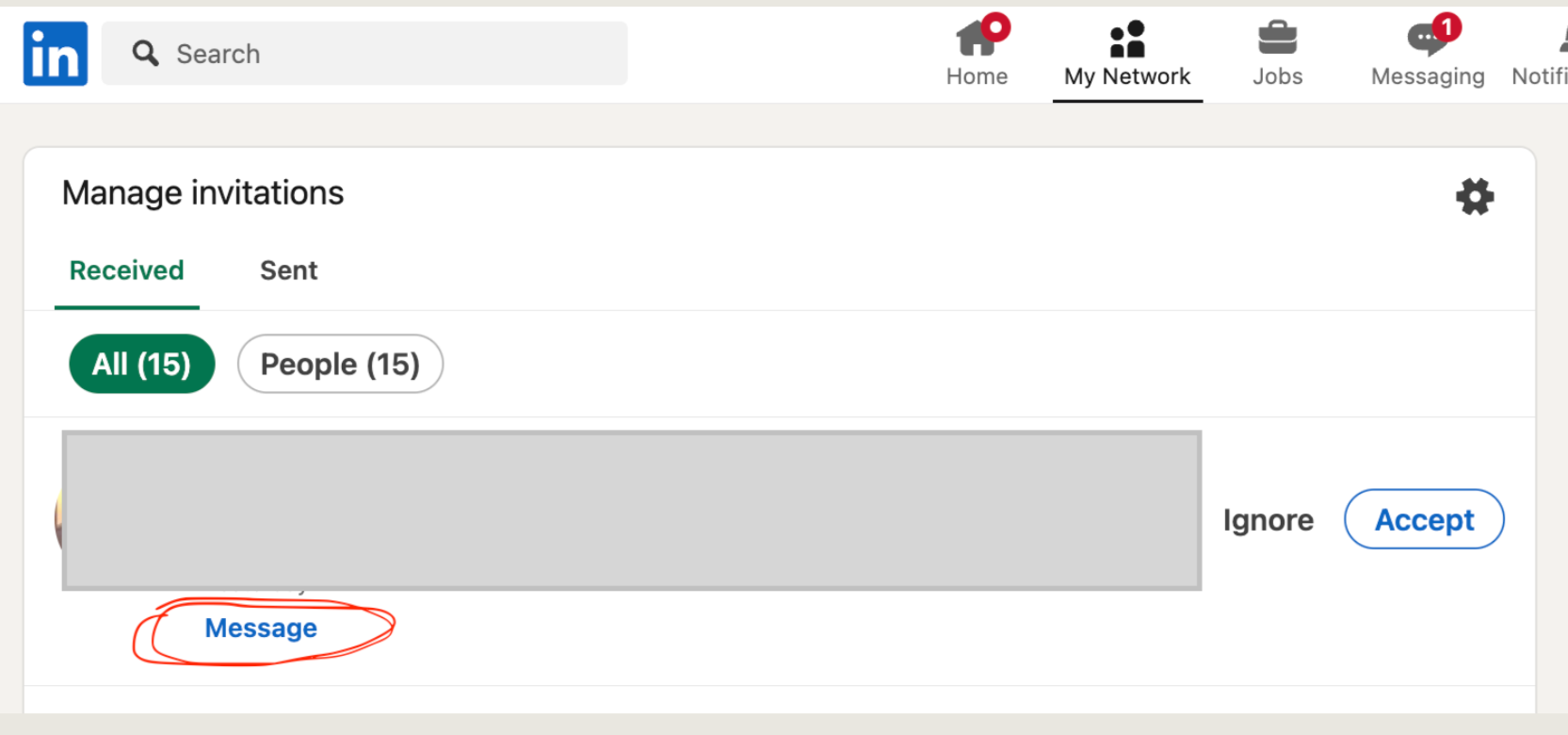
Old version: The LinkedIn feature being phased out allowed you to message a connection request before accepting by clicking: ‘my network ’, then ’see all’.
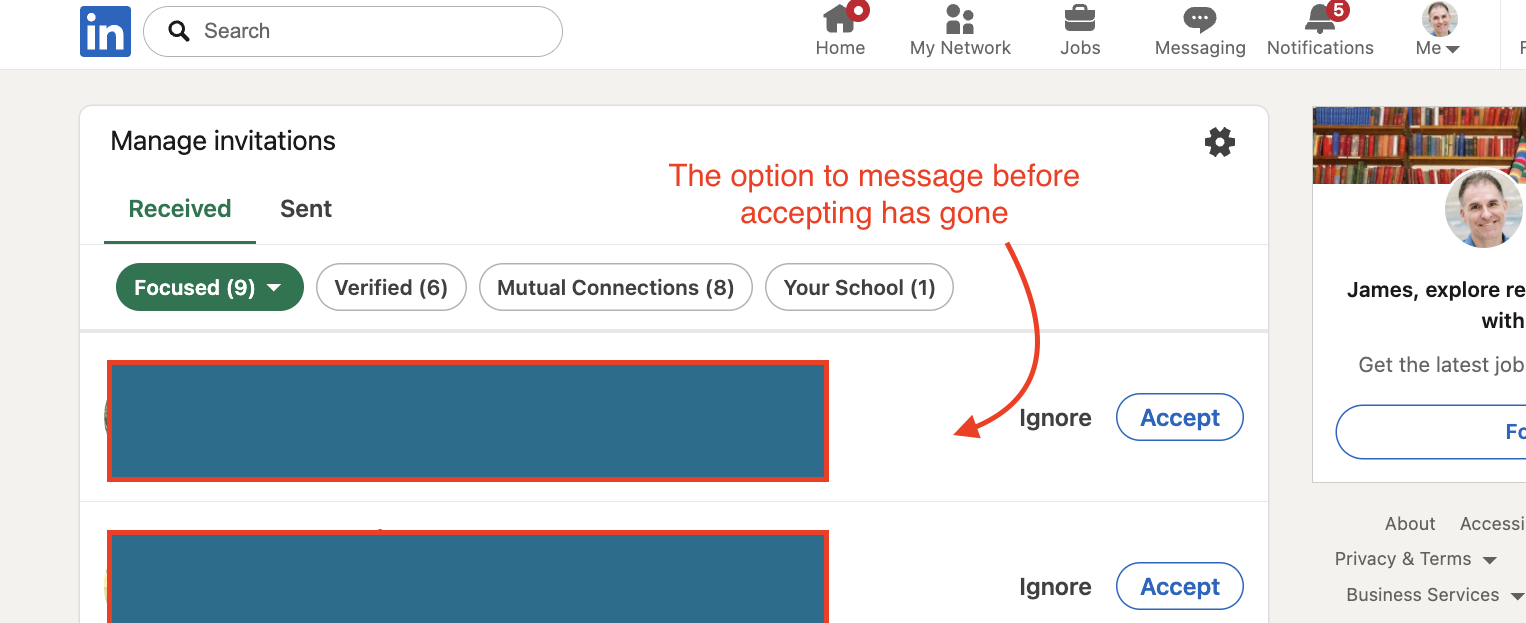
New version: Now the option is gone. Our only choice is to either accept or ignore an inbound connection request, which causes many problems when building a network!
“How did you screen connection requests on LinkedIn?”
Someone sent me a connection request; I clicked “My Network”. On the next screen, in the top right of ‘Invitations’, there was an option to “see all”. That led to a different page where each person and their request had a lovely ‘Message’ button next to it (see the ‘Old Version’ screenshot). That meant I then spoke to them before accepting the connection request. A basic, friendly message:
“Thanks for reaching out, not sure we’ve met before. I’m happy to connect with people here to network. How’s business?”
(A lot of people I speak to didn’t realise you could do this. Which is a shame. But don’t worry - it’s being removed now anyway, so we’re all in the same boat!)
It worked well. Many of those people ignored my message. If they ignored me twice, I deleted the request. Because as I’ve explained, it’s not healthy to be connected to disinterested people.
But now there’s a problem. LinkedIn’s new invitations interface is removing that standalone pre-acceptance ‘Message’ option. Depending on when you’re reading this, it may still be there. But unless there’s a huge about-face, it’s being phased out (LinkedIn’s AI bot admitted this to me).
This creates a problem. LinkedIn’s current Help guidance describes LinkedIn ‘connections’ as people you already know. While elsewhere it advises you to use the platform to meet new people. And in removing the option to pre-screen, they’ve effectively made it a binary decision: accept the people you already have a relationship with, reject those you don’t. Which is deeply unhelpful if you, like me, want to use LinkedIn to help build your network.
So I’ve had to change my process. It’s more cumbersome than before, but the principle is the same: screen first, connect second, then keep only the people who actually want a relationship.
“How do you continue to screen inbound connections on LinkedIn?”
Step 1: Check my CRM
Before accepting, I search the person’s name in our CRM. Have they visited ONLE? Have we exchanged emails? Have they attended an event or met me through somebody else? Quite often, this answers the question. In these cases, I accept and send them a message.
Step 2: Check their LinkedIn profile
If there’s no obvious connection, I look at their profile for basic signs of authenticity and relevance. Are they clearly a real person? Is there a credible work history? Do we have mutual connections? Is there any obvious reason why our professional worlds might overlap?
I’m not conducting a background investigation. I’m simply trying to distinguish “plausible person worth talking to” from “almost certainly another automated connection request.”
Step 3: Accept the connection
If they look genuine, I accept the request. This is the compromise. I don’t love it, but LinkedIn has forced me down the route! (Warning: the moment you accept the invitation, that person disappears from your Invitations list. So make a note of their name before clicking Accept, because you need to know who you just connected with for the next step.)
Step 4: Find them again and send my screening message
I then find their profile and send a simple message:
“Thanks for reaching out and connecting. I’m not sure if we’ve met before, and if not — hello! I’m always happy to connect with people here to network. What prompted you to connect, and how’s business going?”
I’m not trying to catch anyone out. I’m giving them an easy opportunity to turn their button click into a conversation.
Step 5: ‘Star’ the conversation
Once I’ve sent the message, I ‘star’ the conversation (it’s an option you’ll see in Messages). By ‘starring’ this message, I then use the LinkedIn message filter to circle back to these new connections (as opposed to something even more laborious, such as building a spreadsheet or adding them to a CRM). That star now means: new connection, awaiting a meaningful response. Once someone replies properly, I remove the star and they simply become part of my network.
Step 6: Give non-responders one nudge
A few weeks later, I review my Starred messages. If someone hasn’t replied, I send one final nudge:
“Just checking you saw this?”
That’s it. No elaborate follow-up sequence. They requested the connection and have ignored me. So I’m perfectly comfortable being blunt!
Step 7: No response? Disconnect.
If they still don’t reply, I disconnect. Harsh? Not really. It’s like someone walking up to me at a networking meeting, handing me a business card and saying nothing while staring at me. And then when I attempt to speak, IGNORING ME TWICE. Whatever their motivation or reasoning (and I know many people have outsourced LinkedIn, or simply don’t get it on a human level), at that point, there’s no relationship and therefore nothing to lose.
So my revised process is:
CRM check → profile check → accept → find profile → message → star → follow up → retain or disconnect
It’s not as elegant as the old system, but it still allows me to protect the quality of my LinkedIn network without automatically rejecting potentially valuable new connections. The principle hasn’t changed: don’t confuse collecting connections with building a network.
(If you’re interested in learning what removing the messaging option means for making connections on LinkedIn, and a wider look at how I believe networking now works on the platform, take a look at my other blog: Why LinkedIn’s Connection Barriers Matter For Anyone Building A Business Network)
Whatever the motivation, LinkedIn has made it harder to establish that trust with somebody who approaches you through its own platform. So until it provides a better replacement, this is the system I'll be using.
* I could spend hours thinking about the most appropriate creatives to reference here. I’m showing a bit of my bias. I could easily have put Stephen King, but I do genuinely love Sally Rooney books. And thought it might make me seem a bit more attuned to contemporary culture if I picked her. And I’m sorry if you felt like you wasted your time reading that insight into my mind. Imagine how I feel having to be in that brain all the time!